How to Download Technical Report
In downloading Technical Reports, brands are allowed to view and download Technical Reports for all their suppliers while suppliers are only permitted to view and download their respective technical reports.
Step 1: Access the System
- Login to CleanChain.
Step 2: Download Technical Report
1. Select Chemical.
2. Select Inventory.
2. Select Inventory.
3. Select the Technical Report tab.
4. Select Technical Report of Suppliers to download, then click Ok.
5. Filter report by inventory date
6. Click Extract to download the report.
7. Then, open the downloaded Technical Report in excel.
1. Select Dashboard.
2. Select Chemical.
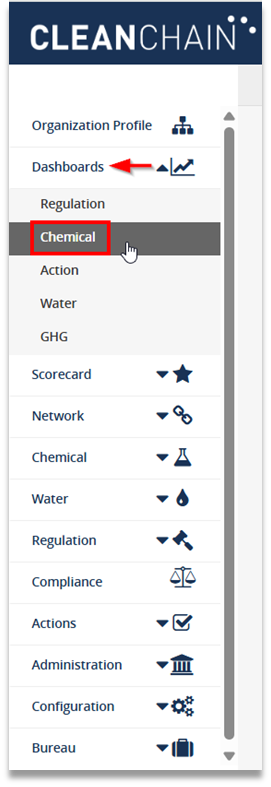
2. Select Chemical.
3. Click Supplier Conformance tab.

4. Click the Dropdown Arrow and select Technical Report to download the InCheck Report in bulk.
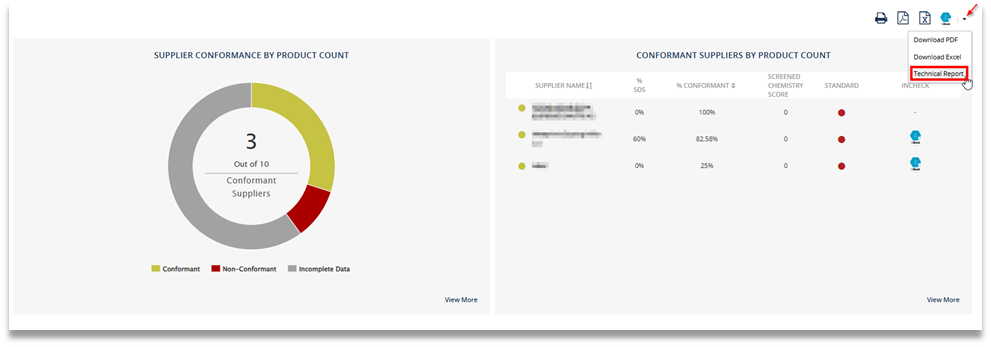
5. After downloading, open the ZIP file to view the Technical Reports.